C01


Power Bank vs Portable Power Station: How to Choose by Device Load and Real Runtime
The phrase 'a big power bank' can mean a USB-C battery that fits in a jacket pocket, a 300W-500W AC power bank with a mains socket, or a small portable power station with a pure sine inverter and pass-through charging. Those are different tools. The buying mistake is not picking the wrong brand; it is picking the wrong category because the marketing mixes milliampere-hours, watts and watt-hours.
This guide uses a device-first method. You will inventory every load by plug type, convert mAh to Wh, total the continuous watts, subtract the losses that are easy to miss, and then match the result to a category. If you need the category definition first, the separate guide to what a portable power station is covers it; this article assumes you are choosing between a power bank and a portable power station and need a sizing decision.

Start With the Plug, Not the Product Name: A Load Audit Methodology
Open a spreadsheet or a sheet of paper and walk the rooms you want to keep running. For each device, record four things: the plug type, the nameplate wattage, the measured draw, and the hours per day it actually runs. Nameplate figures are often maximums, not averages. A 65W laptop adapter does not mean the laptop pulls 65W all the time, and a router may draw only low single-digit watts for most of the day.
- Separate the always-on loads from the occasional loads. A Wi-Fi router, ONT or modem, smart speaker and standby TV are always-on. A laptop, printer, fan or small appliance is occasional. Always-on loads decide your minimum usable capacity; occasional loads decide your continuous AC rating.
- Mark every AC-only device. Lamps, fans, small kitchen tools, monitors and routers with mains adapters need an AC outlet or a suitable DC adapter. If everything you own is USB-C or USB-A, a USB power bank is the correct category and a portable power station is overkill.
- Use a plug-in energy meter for AC loads. Run the device through a normal day or a representative work session and record watt-hours, not just instantaneous watts. For USB loads, use a USB-C meter and record the actual charge session, not the charger label.
- Note startup surge. Devices with motors or compressors may draw a brief surge well above their running wattage. If the surge is close to the station's surge rating, the station may trip even when the continuous rating looks adequate.
The decision rule is simple: if every load is USB, buy a USB power bank. If you have one or more AC loads, you need an inverter, and the question becomes whether you need an AC power bank or a small portable power station. That choice depends on watt-hours, continuous watts and whether the unit can pass power through while recharging.
mAh vs Wh: The Conversion That Reveals What You're Really Buying
Watt-hours are the only fair way to compare a USB power bank with a portable power station. The conversion is: Wh = mAh × V ÷ 1000. Use the nominal voltage printed on the battery label, not the USB output voltage. A 20,000mAh pack at 3.7V has about 74Wh of nominal energy. If you use the 5V USB output voltage instead, you get 100Wh, which overstates the pack's stored energy and makes the comparison misleading.
A 20,000mAh power bank does not mean 20,000mAh at 230V AC. It means cell capacity at the internal battery voltage. Once you add an AC inverter, you add conversion losses, idle draw and heat. That is why a small AC power bank with a headline 500W output can deliver far less useful energy than its box suggests.
Before you compare anything, convert every candidate to Wh and ask for usable Wh. If a listing gives only mAh, calculate it. If it gives only watts, ask for watt-hours. A 500W power bank and a 500Wh portable power station are not the same product, and the difference matters more than the badge.
Where the Line Blurs: 300W-500W 'AC Power Banks' vs Small Power Stations
A 300W power bank or 500W power bank usually means an AC output rating, not a capacity rating. The unit may have a small battery, a modified sine inverter and no pass-through charging. A small portable power station may have the same AC output but a larger battery, a pure sine inverter, pass-through charging and a better cooling design. People search for the best portable power bank with AC outlet, but the useful question is whether the unit behaves like a station when the mains fails.
Check four specifications before you treat a 300W-500W AC power bank as a station replacement:
- Continuous AC watts and surge watts. A 500W continuous rating with no surge figure is incomplete. You need both for anything with a motor or a compressor.
- Watt-hours, not just mAh. A 500W AC bank with a small Wh figure can run a lamp for a while, but it will not carry a router, laptop and phone through a working day.
- Inverter type. Pure sine wave is the safer specification for sensitive electronics. Modified sine is a compromise that some adapters tolerate and others do not.
- Pass-through and transfer behaviour. If the unit cannot charge itself while powering loads, your router will drop every time you recharge. That is a station function, not a power bank function.
This middle ground is legitimate for short, supervised AC use: a lamp, a fan, a small TV or a camera battery charger. It is a poor fit for always-on router uptime or repeated laptop charging. The trade-off is price and weight against reliability; the AC power bank is lighter and cheaper, but it often gives up capacity, waveform quality and pass-through behaviour.
Runtime Math for the Devices People Actually Run: A Calculation Walkthrough
The basic runtime formula is: runtime hours = usable Wh ÷ continuous load W. Start with the ideal figure, then derate it for inverter losses, idle draw and the depth of discharge you are willing to use. Do not treat the ideal figure as a promise.
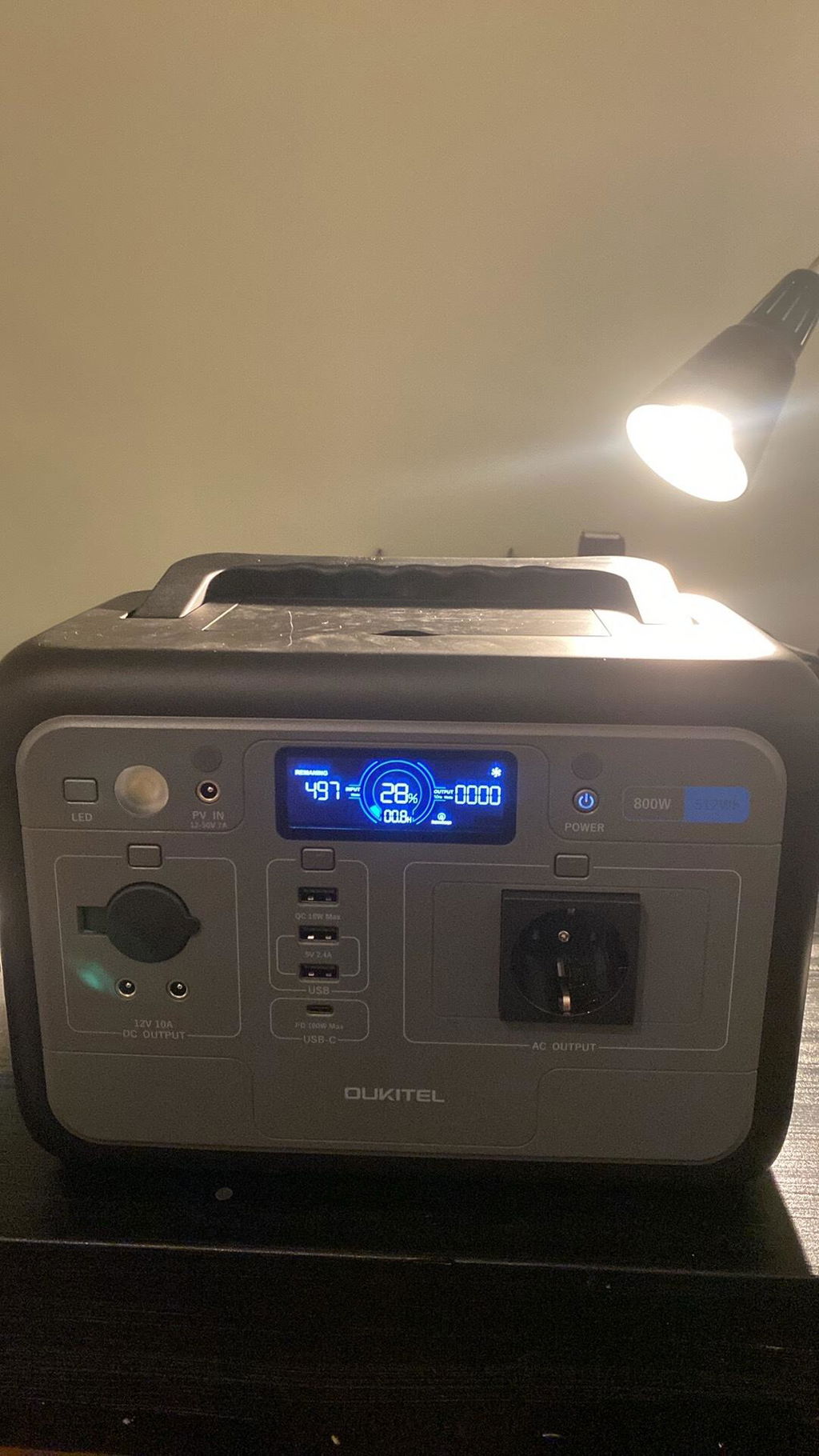
Using the rated capacities from the product specifications: the OUKITEL P800 has 512Wh and an 800W AC output. At a full 800W load, the ideal runtime is 0.64 hours, or about 38 minutes. At 400W, the ideal runtime is 1.28 hours. The OUKITEL P1000 PLUS has 1024Wh and an 1800W AC output. At 800W, the ideal runtime is 1.28 hours; at 1800W, it is about 0.57 hours. Those are ceilings before losses.
For a mixed workday, use measured loads. Suppose a remote worker measures a router and ONT at low single-digit watts, plans 8W for that pair, uses a 65W USB-C laptop adapter as the planning figure and a 15W phone charger. The total planning load is 88W. The P800's ideal runtime is about 5.8 hours; the P1000 PLUS's ideal runtime is about 11.6 hours. Real runtime will be lower because the laptop may not draw the full adapter rating, and because the inverter has losses and idle draw. Measure the laptop's actual charge session rather than assuming the adapter label is the load.
A Nintendo Switch dock is a special case: it uses a 15V USB-C input, so check the bank's USB-C PD profile rather than comparing mAh. A portable power bank battery charger docking station setup is not automatically equivalent to an AC station. If the dock needs a profile the bank does not supply, it may not operate in docked mode even if the bank has plenty of nominal capacity.
For a 400W small appliance, the P800's ideal runtime is about 1.3 hours and the P1000 PLUS's is about 2.6 hours. If that appliance has a high startup surge, check the surge rating before the continuous rating. A unit can run a 400W load steadily and still trip on a brief 1200W surge.
Continuous Watts, Surge and Waveform: Reading the Rating That Actually Matters
Continuous watts tell you what the inverter can supply for a sustained period. Surge watts tell you what it can supply briefly during startup. The P800 is rated at 800W continuous and 1600W surge; the P1000 PLUS is rated at 1800W continuous and 3600W surge. Those are the figures to compare with your load audit, not the battery capacity alone.
Waveform is the second filter. Pure sine wave is the safer choice for routers, laptops, monitors and devices with electronic power supplies. Modified sine wave can work with simple resistive loads, but it is a compromise for sensitive electronics. If a listing does not state the waveform, treat the inverter as unknown.
The decision rule: add up continuous watts, add the largest surge you expect, then leave headroom. If your continuous load is close to the station's continuous rating, the fan will run harder, heat will rise and efficiency will suffer. If your surge is close to the surge rating, nuisance trips become likely.
Turning a USB Power Bank Into a Mini Power Station: Inverters, PD Adapters and the Efficiency Tax
USB PD 3.1 can deliver up to 240W over USB-C, but that is a DC standard, not an AC outlet. A small inverter can turn a USB power bank into a makeshift AC source, and a USB-C PD adapter can power some DC devices directly. Both approaches carry an efficiency tax and a safety trade-off.
A separate inverter adds conversion losses, idle draw and heat. It usually has no pass-through charging, no UPS transfer and no coordinated battery management with the bank. The result is a stopgap for a low-watt device you can supervise, not a router backup you can leave running unattended. If you want to turn portable power banks into a power station, an integrated station is the more predictable route because the inverter, battery management and cooling are designed as one system.
The trade-off is real: a separate inverter is cheaper and lets you reuse a bank you already own, but it gives up efficiency, waveform certainty and uptime features. If the load is a phone, a tablet or a camera battery, stay on USB. If the load is a mains router or a laptop charger, use a unit with a built-in AC outlet and a documented continuous rating.
Pass-Through Charging, UPS Switchover and Recharge Time: The Details That Decide Outage Uptime
Capacity gets the attention, but pass-through charging and transfer time decide whether your router stays online. Pass-through means the unit can charge itself from the wall while powering loads. When the mains fails, a unit with a fast transfer time can switch to battery before the router reboots. The P800 and P1000 PLUS both list EPS switching under 10ms, which is the relevant specification for always-on network gear.
There is no universal cross-brand switchover standard, so do not assume a product has UPS behaviour because it has an AC outlet. Ask for the transfer time, the pass-through rating and the recharge time. The P800 charges from AC at up to 500W and reaches full in about 1 hour; solar input is up to 200W with a full charge in about 2.75 hours; combined AC and solar input is up to 600W with a full charge in about 55 minutes. The P1000 PLUS charges from AC at up to 1200W in about 1 hour; solar input is up to 500W with a full charge in about 2.05 hours; combined input is up to 1700W with a full charge in about 36 minutes.
If a unit cannot pass through, your router will drop every time you plug the unit into the wall to recharge. That is a common failure mode in outages that last longer than one battery cycle. For a remote worker, recharge speed and pass-through matter more than an extra 100Wh of nominal capacity.
Common Underestimates: Hidden Loads, Inverter Losses and Cold-Weather Derating
The first-timer's error is adding up the big devices and forgetting the small ones. A router and ONT may draw only low single-digit watts each, but they run 24 hours a day. A laptop may draw far less than its adapter rating while idling, then jump when it charges. A TV in standby still draws power. An inverter with no load still draws idle power. These hidden loads turn a comfortable-looking runtime into a short one.
Cold weather is a specification issue, not just a performance issue. The P800 and P1000 PLUS list an operating temperature of 0°C-40°C and a storage temperature of -10°C-40°C. Below 0°C you are outside the operating spec, so do not plan on running either unit in a freezing garage or tent without checking the manufacturer's guidance. Solar recharging in bad weather is another underestimate: a 200W or 500W solar input is a maximum, not a guarantee on a cloudy day.
- Positive checklist example. Suppose a renter measures a router and ONT at low single-digit watts, uses a 65W laptop adapter and a 15W phone charger, and totals 88W of planning load. They choose a 512Wh P800 because the AC load stays below the 800W continuous rating, the inverter is pure sine wave, and the unit can pass through and recharge in about an hour from AC. The setup works because they measured the load, checked the continuous rating and tested the router through a transfer before the outage.
- Negative checklist example. Suppose a traveller buys a 500W AC power bank because the box says 500W, assumes that means 500Wh, and plans to run a router and laptop for a weekend. The unit can light a lamp, but its watt-hour capacity is small, its inverter idle draw eats into runtime, and it has no pass-through, so the router drops when the unit is recharged. The purchase fails because they compared an output wattage with an energy need and never checked Wh or transfer behaviour.
- Common mistake. Buying by output watts alone. A 300W power bank and a 300W portable power station can have completely different battery capacities, waveforms and uptime features.
Product Sizing Table: Match Daily Wh to Battery Capacity
Use your measured daily load in Wh, then add a margin for conversion losses and aging. The table below maps daily load ranges to capacity classes and examples. It is a planning guide, not a substitute for your own meter readings.
| Measured daily load | Planning capacity with margin | Category to consider | Example |
|---|---|---|---|
| Under 75Wh | USB power bank only | USB-C/USB-A, no AC outlet | 20,000mAh-class bank |
| 75-250Wh | 150-500Wh | AC power bank or small station; check continuous AC | 300W-500W AC power bank |
| 250-500Wh | 500-1000Wh | Small portable power station | OUKITEL P800 (512Wh) |
| 500-800Wh | 1000-1600Wh | 1kWh-class station | OUKITEL P1000 PLUS (1024Wh) |
| Above 800Wh | Above 1.6kWh or reduce loads | Larger station or split loads; neither small category fits comfortably | Check portable power stations |
Reference point: OUKITEL P800
The OUKITEL P800 is a 512Wh LiFePO4 unit with an 800W continuous AC output and 1600W surge. It uses a pure sine wave inverter, lists 4000 cycles and a 10-year life, weighs 6kg and measures 29.4 × 17.8 × 20.5 cm. AC input is up to 500W with a full charge in about 1 hour; solar input is up to 200W with a full charge in about 2.75 hours; combined input is up to 600W with a full charge in about 55 minutes. It has one 800W AC outlet, one USB-C PD 100W port, one USB-C QC3 18W port, two USB-A 12W ports, two DC 12V outputs, a car outlet and a 3W LED light. It is the more natural fit for a router, laptop and phone day where the AC load is modest and the unit needs to be easy to move.
Reference point: OUKITEL P1000 PLUS
The OUKITEL P1000 PLUS is a 1024Wh LiFePO4 unit with an 1800W continuous AC output and 3600W surge. It uses a pure sine wave inverter, lists 4000 cycles and a 10-year life, weighs 12kg and measures 34.6 × 22.8 × 23.8 cm. AC input is up to 1200W with a full charge in about 1 hour; solar input is up to 500W with a full charge in about 2.05 hours; combined input is up to 1700W with a full charge in about 36 minutes. It has four 1800W AC outlets, one USB-C PD 100W port, one USB-C PD 20W port and two USB-A 18W ports. It also lists a noise level below 29dB and app control via WiFi and Bluetooth. It fits when the daily load is higher, when multiple AC devices need to run, or when faster AC recharge matters.
Safety Margin Rules: Read the Tech Specs, Not the Badge
Plan for 1.5 times your measured daily Wh as a normal margin, and move toward 2 times if you rely on solar in winter, if the load is critical, or if you expect to add devices later. The P800 and P1000 PLUS both use LiFePO4 batteries rated for 4000 cycles and a 10-year life, but cycle life does not erase the need for capacity headroom. Aging reduces usable capacity gradually, and a unit that is barely adequate when new will be frustrating after a few seasons.
- Continuous and surge headroom. Keep your continuous load comfortably below the AC rating, and check the surge figure for anything with a motor or compressor. The P800's 800W continuous and 1600W surge are not interchangeable with the P1000 PLUS's 1800W continuous and 3600W surge.
- Temperature limits. The P800 and P1000 PLUS are rated for 0°C-40°C operation and -10°C-40°C storage. If you plan to run either unit below freezing, you are outside the operating specification and should check the manufacturer's guidance before relying on it.
- Air travel limits. Current FAA guidance treats power stations as lithium-ion batteries: 0-100Wh units are generally allowed, 101-160Wh units need airline approval, and units above 160Wh are forbidden on passenger aircraft. The P800 at 512Wh and P1000 PLUS at 1024Wh are both above 160Wh, so they are not cabin travel power stations.[1] Current IATA passenger guidance also limits power banks to two per passenger, prohibits in-flight recharging and discourages overhead-bin storage.
- Recharge logistics. A 512Wh P800 can refill in about 1 hour from a 500W AC source; a 1024Wh P1000 PLUS can refill in about 1 hour from a 1200W AC source. If your outage plan depends on solar, the 200W and 500W solar inputs are maximums and should be checked against real weather.
The safety rule is to match the unit to the environment and the transport plan, not just the load list. A unit that is perfect on a desk can be the wrong choice in a freezing garage or on a flight.
Weight, Airline Limits and Refill Logistics: The Hidden Cost of Going Bigger
Bigger capacity has a weight cost. The P800 is 6kg, which is manageable as a one-hand carry for a desk or a car boot. The P1000 PLUS is 12kg, which is still portable but no longer something you casually move between floors with one hand. If the unit will live in a cupboard and only come out during outages, weight matters less. If it will travel, weight and airline limits matter more than the capacity headline.
Air travel is a hard boundary. The P800 and P1000 PLUS are above the 160Wh passenger aircraft limit, so they are not travel units under current FAA and IATA framing. A sub-160Wh power bank or a small AC power bank in the approved range is the travel category. Some airlines go further and restrict large portable power stations entirely, so check the airline's current rules before you pack.
Refill logistics are the other hidden cost. A larger unit takes longer to charge on a weak solar input, and a smaller unit may need multiple recharges in a long outage. The P1000 PLUS has the faster combined recharge time, but it also needs a larger solar array or a stronger AC source to exploit that speed. The trade-off is real: capacity gives you runtime, weight and recharge demand take some of it back.
Verification Method: Field-Test Before You Buy
Do not buy from a specification sheet alone. Use a plug-in energy meter for AC devices and a USB-C meter for USB loads, then test the behaviours that decide uptime. If you cannot test before purchase, buy from a seller with a return window and test immediately.
- Measure the always-on load. Run the router and ONT through a meter for 24 hours and record Wh. Repeat with the laptop doing a normal work session, not a synthetic stress test.
- Measure inverter idle draw. Turn the AC output on with no load and note the draw. This is the hidden load that makes small AC power banks disappoint.
- Test pass-through and transfer. Run the router from the unit, plug the unit into the wall, then unplug it. Watch whether the router stays online. Ask for the transfer time; the P800 and P1000 PLUS list EPS switching under 10ms.
- Time a full recharge. Record the recharge from a known state of charge with the AC source you will actually use. A 1-hour claim is only useful if your socket and cable can deliver the rated input.
- Check noise and heat under load. A unit that is quiet at 100W may become noticeable at 800W. The P1000 PLUS lists below 29dB; the P800 does not list a noise figure, so test it if noise matters in your room.
If a seller cannot state continuous AC watts, surge watts, Wh, waveform, pass-through behaviour and transfer time, treat the product as unknown. Those are the specifications that decide whether a power bank or a portable power station is the right category for your load.
Which One Fits Your Week? A Short Decision Path
Use this path to make the first cut, then confirm with your measured Wh:
- All loads are USB-C or USB-A, and no mains device needs to run. Choose a USB power bank. Convert mAh to Wh and ignore AC output claims.
- You need occasional AC for a lamp, fan or small charger, but not always-on router uptime. A 300W-500W AC power bank can work if it has enough Wh and a documented waveform. Test the idle draw.
- You need a router, laptop and phone through a workday, and you want pass-through charging. Choose a small portable power station in the 500Wh class, such as the P800, and keep the continuous load below its 800W rating.
- You need multiple AC loads, a higher continuous rating or faster recharge. Move to the 1kWh class, such as the P1000 PLUS, and check the 1800W continuous and 3600W surge ratings against your largest load.
- You need to fly with it. Stay under 160Wh and check the airline's current rules. Neither the P800 nor the P1000 PLUS is a passenger-aircraft unit under the current 160Wh limit.
- You need solar independence in bad weather. Size at the top of the 1.5-2× range and read the solar charger buying guide before assuming the maximum solar input is achievable.
Final Checklist: Which One Do You Need?
Use this checklist before you buy:
- I have listed every device by plug type, not by product name.
- I have converted every power bank's mAh to Wh using the nominal battery voltage.
- I have measured the always-on load for 24 hours and the laptop charge session separately.
- I have added a margin for inverter losses, idle draw and aging, and I know whether I need 1.5× or 2× my daily Wh.
- I have checked continuous watts, surge watts and waveform, not just the AC output headline.
- I have confirmed pass-through charging and transfer time if router uptime matters.
- I have checked weight, airline limits and recharge time against how I will actually use the unit.
The concrete decision rule is this: if your measured daily load is USB-only, buy a USB power bank; if it includes AC loads and needs to run through an outage, buy a portable power station with enough Wh for 1.5-2 days of measured load and a continuous AC rating above your largest sustained load. If your load is above the station's capacity and you cannot recharge, neither a power bank nor a small station solves the problem; reduce the load or move to a larger system.
Frequently Asked Questions
How long can a power bank actually keep a Wi-Fi router and ONT running during an outage?
It depends on the measured draw of the router and ONT, not the mAh headline. A router and ONT often draw only low single-digit watts each, but they run continuously, so a 74Wh USB bank may give only a short runtime once conversion losses and idle draw are included. Measure the pair for 24 hours, calculate Wh, then divide by the measured load and derate for the inverter if you are using an AC outlet.
Why does a 20,000 mAh power bank deliver so much less energy once it is converted to a wall-style AC outlet?
The 20,000mAh rating is cell capacity at the internal battery voltage, not energy at 230V AC. A 20,000mAh pack at 3.7V is about 74Wh nominal, and an AC inverter adds conversion losses, idle draw and heat. The usable AC energy is therefore lower than the battery label suggests, which is why Wh and inverter behaviour matter more than mAh.
Is a 500W power bank the same thing as a 500Wh portable power station?
No. Watts describe the output rate; watt-hours describe stored energy. A 500W AC power bank may have a small battery and a short runtime, while a 500Wh portable power station may have a 500W or higher continuous output. Check both the Wh capacity and the continuous and surge AC ratings before comparing them.
Can I run AC devices from an ordinary USB power bank using a small inverter, and what do I lose?
You can, but you lose efficiency, predictability and safety margin. A separate inverter adds conversion losses, idle draw and heat, and it usually has no pass-through charging or UPS transfer. Treat it as a supervised stopgap for a low-watt device, not as an always-on router backup.
Do a router, laptop or game console dock need pure sine wave, or is modified sine fine?
Sensitive electronics generally prefer pure sine wave, and it is the safer specification when the device has an electronic power supply. Modified sine can work with some adapters, but it is a compromise and not guaranteed across devices. For a router, laptop or dock you rely on, choose a unit that states pure sine wave rather than assuming compatibility.
Can a unit charge itself and power devices at the same time, and what happens to the router when it can't?
Some units support pass-through charging and some do not. If pass-through is unavailable, the router will drop when you disconnect the unit to recharge it, which is a common failure in longer outages. Check for pass-through and a transfer time specification; the P800 and P1000 PLUS list EPS switching under 10ms.
References
- Federal Aviation Administration - PackSafe: Power Stations, https://www.faa.gov/hazmat/packsafe/resources/power-station-poster
Information in this article was fact-checked against current sources in November 2026. Policies, incentive programs, and regulations change frequently — always confirm current terms with official sources before making financial or legal decisions.
Latest articles
Battery Charger Buying Guide: How to Match Chargers to Your Batteries and Devices

Solar Charger Buying Guide: How to Match Panel Wattage to Your Portable Power Station
Charging Bank vs Power Bank: How to Tell If You're Getting AC Power or Just USB
Power Bank vs Portable Power Station: How to Choose by Device Load and Real Runtime

What Is a Portable Power Station? A Home Backup Guide to Wattage, Capacity and Battery Chemistry